
AI Context, Memory, and Chat History: What Is the Difference?
An AI remembers that you like short answers but uses yesterday’s old deadline. Chat history, stored memory, and what the model sees while answering are not necessarily the same data. Separate them before deciding what to fix.

Stored information is not the same as the information the model currently sees
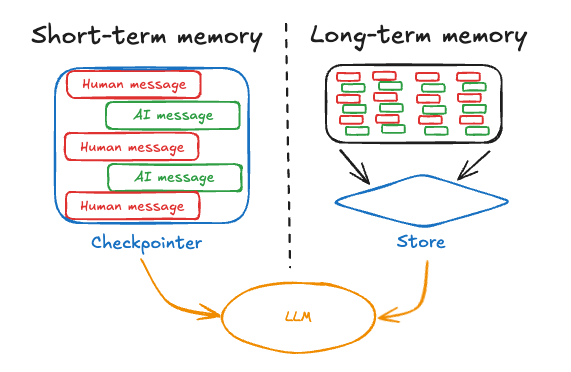
When we say an AI “remembers,” we might mean different things. Context is the information supplied to the model for this reply. Memory is information a system stores and may retrieve across turns or tasks, depending on its design. Chat history is the conversation record a product lets you revisit. These can interact, but they are not interchangeable.
LangChain’s memory documentation discusses thread-level and long-term memory, while Anthropic’s context engineering article discusses selecting information for a limited context. They explain the concepts, not how every AI app stores or deletes data.
This is a conceptual guide, not privacy-settings advice for a particular app. To learn what your account retains and for how long, check that product’s settings and policy.
What's the difference between Context, Memory, and chat history?
| Layer | Questions used for checking | What not to infer |
|---|---|---|
| Context | Which messages, files, or search results does the system send to the model for this response? | That every line of chat history is included in this response’s context |
| Memory | What does the system store, and when does it retrieve it? | That saving it ensures it will be used every time or always retrieved correctly |
| Chat history | Which conversation records can users revisit? | “Deleting a chat also deletes all memories and copies” |
Knowledge learned during model training is another layer. Editing a chat or memory does not retrain the model’s weights, and recalling user information does not necessarily mean the model was trained on it. A system may simply retrieve an old note into context.
Context may include system instructions, tool results, or retrieved content that the chat screen does not show in full. If the app does not expose everything sent to the model, you can inspect only what it reveals. Do not treat the AI’s guess about its own internals as evidence.
Hypothetical example: Remember the style but use the wrong due date.
Imagine someone says “I prefer short Thai answers” and initially sets a Friday deadline. Later, a long conversation in another chat moves it to Thursday. If the system stores the style preference but fails to retrieve the changed date, the AI may answer briefly while still using the outdated Friday deadline.
This is a hypothetical situation, not a test of a real app. For this task, provide the current evidence and say “The deadline for this task is Thursday under the latest announcement; do not use the old plan.” Then inspect the resulting plan for inconsistent dates.
A language preference may carry across tasks; a deadline expires quickly. KrobClick suggests dating temporary information and tying it to a specific task. Verify consequential details against the latest source even if the AI says it remembers.
Why does talking longer not always mean the system understands better?
Context has limits. A system may trim, summarize, or retrieve selected passages. A summary can carry the main point forward while losing an exception from an older chat. Seeing a message in history does not prove the model received it in full for its latest answer.
Anthropic describes organizing context and using notes for longer tasks. Drawing on that approach, KrobClick suggests a separate “current task status” with settled and unresolved items. Check the note against the original documents; it is not a new source of truth.
Current task status: Write a beginner’s guide in Thai, due Thursday under the latest announcement. Do not add prices or experimental results. The outline is done; sources and images still need checking. Before continuing, identify missing information.
This is a hypothetical template. Adapt it to the real task and remove unnecessary data before handing it over. For cross-session work, see the guide to handoffs and task context for more detail.
For tokens and long-document handling, read the context-window guide. Here the focus is on how saved history, retrieved memory, and deletion differ.
Check memory retention and deletion in settings; AI responses do not certify them
- Can you inspect, edit, or delete memory entries, and what kinds of data do they include?
- Does deleting a chat also delete memory, or are these separate controls?
- Are attachments, connected-app data, and task records governed by the same policy?
- How long is information retained, and what backups or organizational controls apply?
- Is model-training use controlled separately from memory storage and retrieval?
These are questions for checking a policy, not a claim that every app provides all these controls. If an AI says “I forgot” without a verifiable deletion control or status, its reply does not establish that data is gone from every layer.
Carry work forward with current evidence
Memory can save repeated typing, but deadlines, figures, contract terms, and permissions need current sources. Begin a new session with a short task status and the relevant file or link, then compare the output with that version.
Rather than asking “Do you remember me?”, ask “Which version of the information did you use, and what needs reconfirmation?” Then check the source. The AI’s reply can point you toward a check, but cannot prove its own inputs were complete or current.
Sources
Sources reviewed October 14, 2026, Thailand time. Thai examples and prompts are KrobClick proposals, not product tests. Features and settings vary by version/account. Check originals and outputs before real use.