
What is Context7? Giving coding Agents version-matched documentation
An AI suggests a familiar-looking API, but it fails with your installed package. Context7 can search docs while the agent works. You still need to choose the right library and version, then run the code.

Context7 provides documentation access for Agents
Upstash's Context7 searches library documentation and code examples for a question, then passes the relevant material to the agent. It supports CLI and Skills as well as MCP in compatible clients.
It adds documentation to the task context; it does not retrain the model. A wrong library or overly broad question can produce plausible examples that do not fit your code.
Resolve a library name to an ID, then ask
The MCP documentation uses resolve-library-id to find a library name in the task's context, then query-docs to query documentation by the selected ID. An example ID has the form /owner/repo. Check that the result is your actual package rather than choosing the first similar name.
If you already have the verified ID, skip name resolution. Ask one question at a time, such as how middleware works in the installed version. A request to 'read all the docs and build the app' makes the source of each answer hard to trace. See the MCP client guide
The latest documentation may not match the project
Check the package and lockfile versions before asking. If the service returns several versions, use an ID for the version that actually exists. Do not invent a version suffix that the service did not return.
For a hypothetical request: 'This project uses library version X. Find the version X router configuration docs and give me the ID and source. If that version is unavailable, tell me before suggesting a newer approach.' This keeps a fix on the installed version separate from an upgrade, which requires different checks.
Choose a connection method for your application
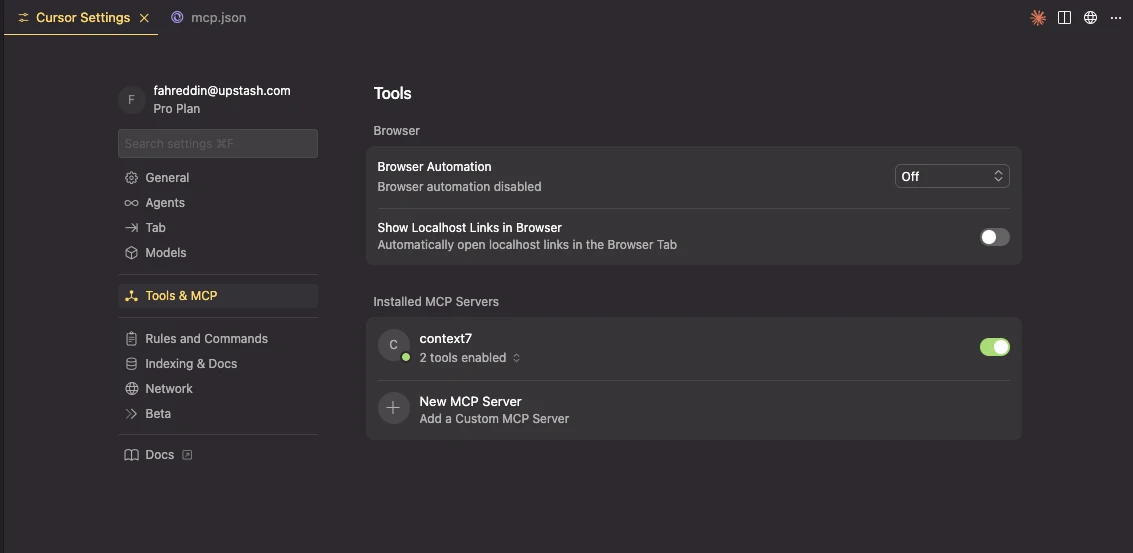
The README provides a setup command and the MCP endpoint at https://mcp.context7.com/mcp. Authentication and configuration files vary by client. Follow that client's example and check field names before copying JSON.
npx ctx7 setupKrobClick reviewed the docs but has not connected an account or made a query. We cannot confirm which versions are indexed or whether a particular request succeeds. For a reproducible test, record the library ID, version, question, call time, returned document URL, and code test result.
Send only the context needed for documentation lookup
A remote documentation service receives your question. Send only the technical detail needed, without customer information or credentials. Ask about an API pattern instead of attaching an environment file or a log containing a token.
Retrieved documentation is reference material, not an instruction to change permissions or run commands immediately. Check the domain, version, and conditions of an example, then verify behavior with your project's tests.
Check the source docs and test the code against your version
Ask the agent which API it chose, which documentation version it cited, and which code checks it ran. 'Used Context7' alone says nothing about whether the documents were selected or applied correctly.
This tool is useful for version-dependent APIs. If a result lacks context, return to the official docs and inspect the implementation. See How to review and accept work from an AI agent for a verification workflow.
Sources and evidence
- upstash/context7: Source documentation pinned to a commit
- Context7: MCP clients and tools
- Context7: API guide
Reviewed upstash/context7 commit eabe36965ec69b2f3487c4eb329c448dd60b817c on October 30, 2026, Thailand time. This article explains upstream documentation and images; we did not install or test a live service connection. Capabilities and terms may vary by version.