
Use KrobClick's electricity calculator: units, Ft, and totals
If the estimate does not match your bill, do not keep adjusting Ft at random. Check three things on the bill first: units used in that period, customer category, and the units in which Ft is stated.

Use billing data, not cumulative meter readings
To compare an estimate with your bill, start with the “units used” field on the bill. KrobClick electricity bill calculator combines that figure with your customer category and Ft to estimate a standard residential MEA or PEA bill, breaking out the energy charge, service charge, Ft, and VAT. It helps you trace the bill; the utility has not verified the estimate as the amount due.
Enter the kWh used during the billing period, not the meter’s cumulative reading. If you read the meter yourself, check how to read it and whether a multiplier applies. The wattage printed on an appliance is not a kWh figure: watts measure power; kWh measures energy used.
Choose the category and enter Ft in the correct unit
- Check whether your bill is from MEA or PEA and select the same provider.
- Read the customer category on your bill before choosing 1.1.1 or 1.1.2. Do not infer it from one month’s usage.
- Enter the units for that period, such as 350, not a payment of 350 baht.
- Check the Ft announcement for that period and convert units correctly. This field takes baht per unit: if the published figure is 16.23 satang per unit, enter 0.1623.
- Read the itemized charges and the total, which update immediately. You can copy the summary to compare with your bill.
Under the PEA tariff, the customer category also depends on meter size and usage history over consecutive periods. Using 150 units this month alone does not establish your category. If the bill differs from what you expected, ask the utility. The calculator neither determines eligibility nor changes your category.
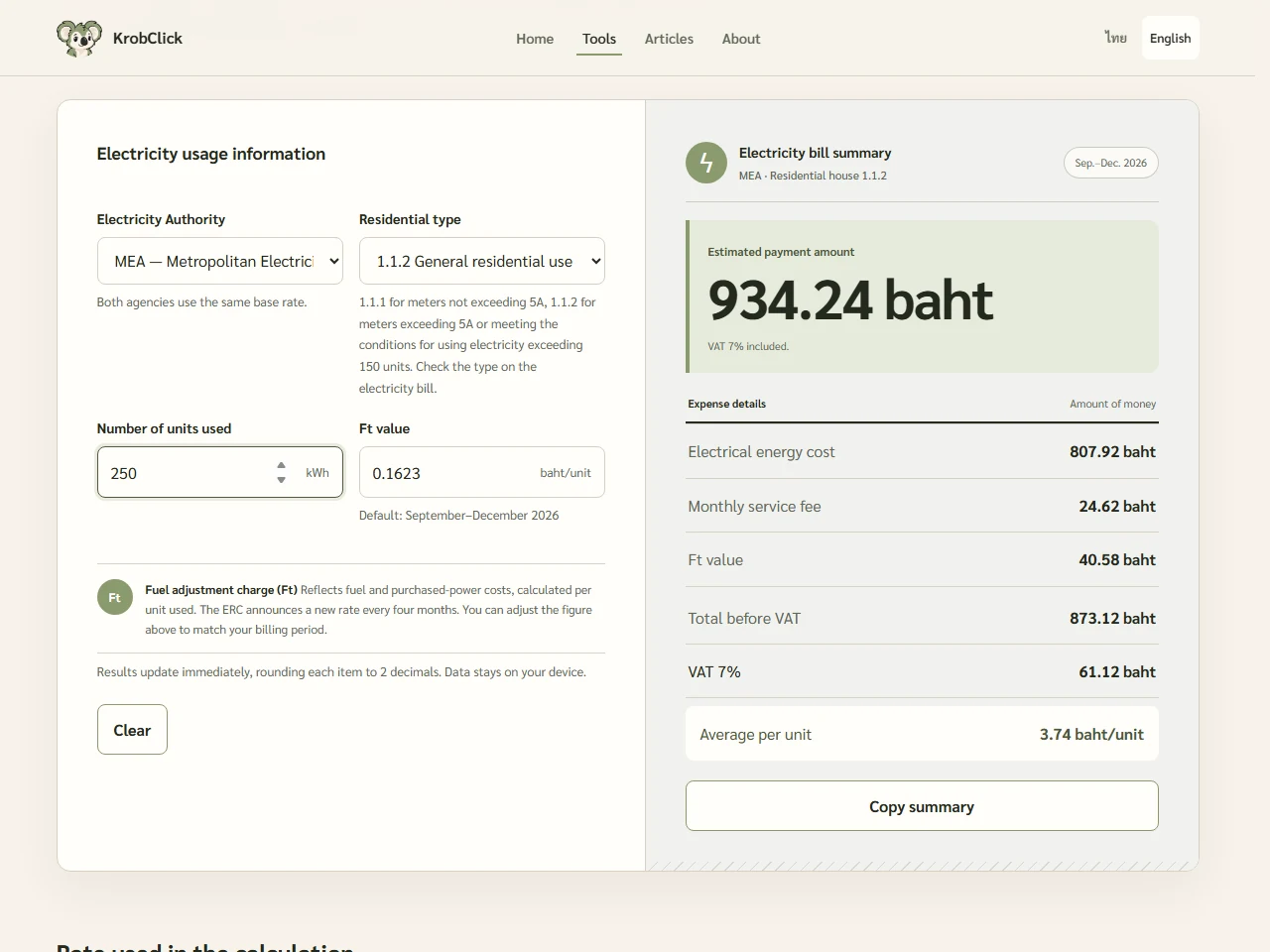
A 350-unit example you can calculate and check
Consider a hypothetical category 1.1.2 home using 350 kWh and Ft of 0.1623 baht/unit for September–December 2026, as checked on PEA’s page on October 21, 2026. The relevant PEA base rates charge 3 baht for each of the first 200 units and 4.1584 baht for each of the next 150. You can trace each line of the table.
| items | How to check | Number of baht |
|---|---|---|
| Energy cost | 200 × 3 + 150 × 4.1584 | 1,223.76 |
| Service fee | Category 1.1.2 tariffs used in the example | 24.62 |
| Ft value | 350 × 0.1623, rounded to two decimal places | 56.81 |
| Total before VAT | 1,223.76 + 24.62 + 56.81 | 1,305.19 |
| VAT | 1,305.19 × 7%, rounded to two decimal places | 91.36 |
| Total | 1,305.19 + 91.36 | 1,396.55 |
| Average per unit | 1,396.55 ÷ 350, rounded to two decimal places | 3.99 baht/unit |
Rounding order matters: the calculator rounds the energy and Ft charges to two decimal places before summing them, then calculates 7% VAT and rounds again. Adding unrounded figures first may differ by a satang. The 3.99 baht/unit is this example’s total average including the service charge and tax, not the tier rate applied to every unit.
Do saved electricity units reduce the bill by the average unit cost?
You cannot always multiply units saved by the average price: the removed units may have been in a higher tier, while the service charge remains. Keeping the same category and Ft but dropping from 350 to 300 units gives an estimated 1,165.39 baht, a difference of 231.16 baht. That is not the result of multiplying 50 by 3.99.
Enter two usage figures while keeping the category and Ft constant, and treat the difference as a formula-based estimate. It does not prove a saving device or solar system will lower your actual bill by that amount. For solar, read solar conditions and estimates separately.
What to check when results differ from your bill
- Do the customer category and billing month match, especially for historical bills?
- Is Ft in baht or satang per unit, and does it match that period's announcement?
- Does the bill have any discounts, free electricity entitlements, outstanding balances, fees, or other adjustments that the tool doesn't include?
- Is it a normal or TOU tariff? This tool does not separate time-of-use billing periods.
- Does the program's base tariff match the desired billing period? Changing Ft alone does not change base tariff tiers or service charges.
You can edit Ft, but the tool does not automatically fetch every new announcement. Before using another period, compare its default and period label against PEA's Ft page or your utility’s announcement. At 0 units, the model may still include service charges and tax even though the average field shows 0 because there are no units to divide by.
The calculation runs in your browser; it does not send your bill to a utility for review or confirm your payment. If you still cannot explain the difference, rely on the utility bill and ask the provider, giving the billing period and customer category.
Sources
- PEA: electricity tariff table effective September 2026
- PEA: Periodic Ft Value
- Energy Regulatory Commission: Ft determination document
- KrobClick electricity bill calculator
Reviewed PEA tariffs, Ft announcements, and KrobClick code on October 21, 2026. Examples are hypothetical learning aids, not bills or confirmation of actual charges, and not personalized financial, legal, or tax advice.