
Gemini Files API vs. File Search: Retention and Deletion
Do you assume a PDF sent to Gemini disappears completely within two days? The answer depends on whether you attach it with the Files API or build a searchable document collection with File Search. This article separates the two systems before you submit real data.

Attaching a file for one question and building a search collection use data differently
If you want to ask Gemini about one PDF, Files API lets you upload it for reference in a request. If you need to search the same documents repeatedly, File Search indexes content to retrieve relevant passages. The two approaches have different data lifecycles.
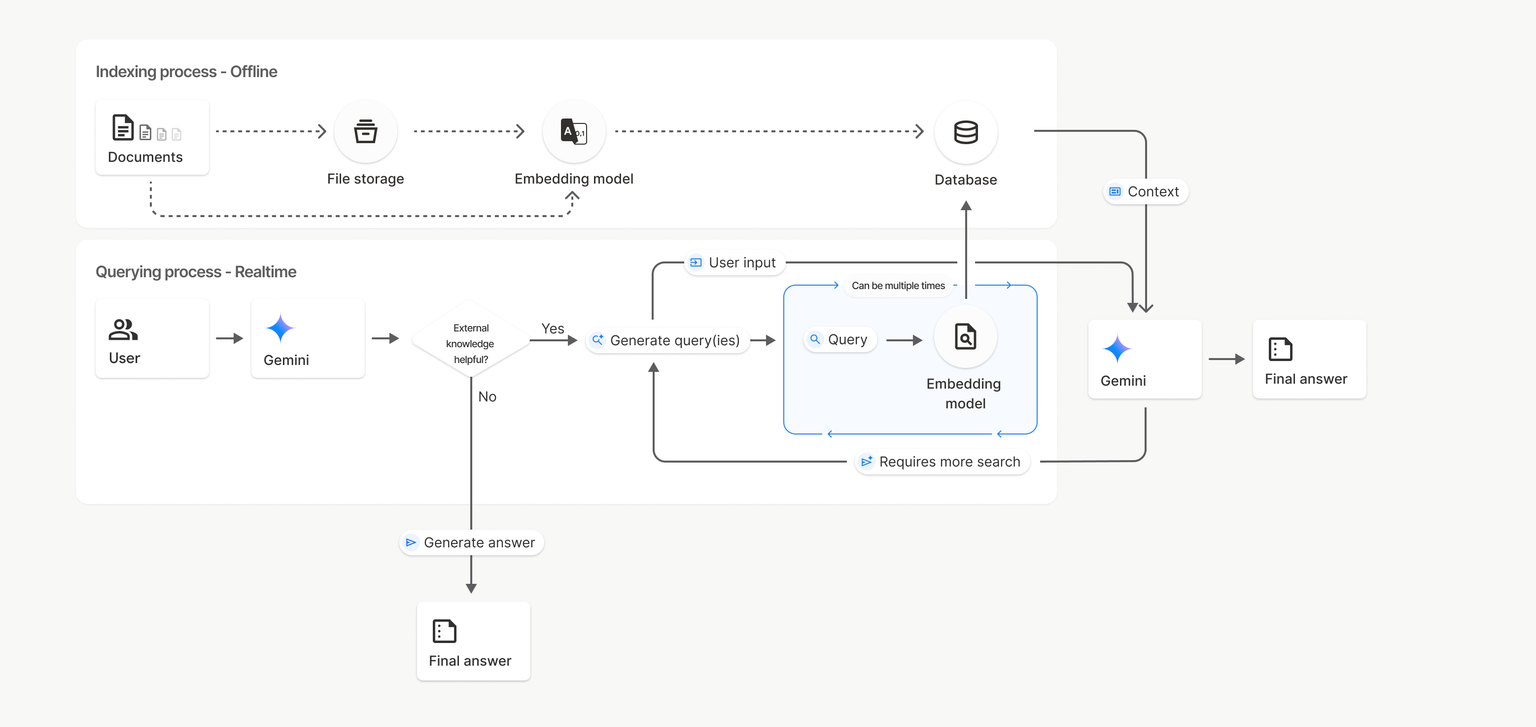
According to the Gemini Files API uploaded files are automatically deleted after 48 hours, or can be deleted sooner. But File Search keeps indexed content in a store until you delete it or the documented conditions apply. Expiration of the temporary File object does not delete the index.
| Question | Files API | File Search |
|---|---|---|
| What is it used for? | Send files for the model to use with a request | Build a document retrieval source |
| What is stored | Uploaded files and their metadata | Segmented and indexed/embedding data in store |
| Documented retention | Uploaded files: 48 hours | Indexes do not have the same TTL. Deletion of store or imported data must be handled. |
| Things to check | Must expired files be uploaded again? | Is there an old store that is no longer used? |
Example: Which approach suits 20 product manuals?
Suppose a team has 20 Thai product manuals: For an occasional warranty question about one manual, attaching it through Files API may suffice. For repeated questions across the same manuals and retrieval of relevant passages, consider File Search.
File Search adds indexing and lifecycle management. If it retrieves the wrong manual version, date, or terms, the answer may be wrong. Specify the version and date, and verify answers against the source text.
Google documents Files API file-size and per-project storage limits, which can change. Before building, check supported file types, request size, and model. Successful upload does not prove the model accurately read every passage.
File deletion does not prove deletion of all copies
Besides Uploaded files and Indexed data there are also abuse-monitoring records as another layer. The Abuse monitoring page reviewed on October 18, 2026 states a 55-day retention period for prompts, context, and responses for this purpose. That is not the File Search store's TTL and does not guarantee that every copy disappears when an uploaded file expires after 48 hours. Check your service and account terms.
Plan deletion across (1) the original Files API file, (2) indexes and content in the File Search store, and (3) your app's own copies, such as databases, logs, and backups. Deleting the original does not automatically remove the other two.
This describes data lifecycles in this architecture not a legal conclusion about all retention. Review policies on service improvement and logging for your account. Do not upload customer, health, or confidential documents to an external service simply because a file expires after 48 hours.
Checklist before uploading actual documents
- Decide whether you need a one-time file question or a reusable search collection.
- Separate public from internal documents and get authorization before sending them outside your system.
- Test with a fictional document containing no personal information, and check retrieval and answers.
- Record the project, File Search stores, access permissions, and planned deletion dates.
- Check current API instructions for deleting files and stores, as well as copies held by your app.
Choose tools based on the required data lifecycle, not just upload convenience
Choose Files API when you need a file attached to a request; consider File Search for repeated document retrieval. Either way, set access and deletion plans from the outset. Automatic file deletion may not cover indexes or other copies.
Sources used for verification
- Google AI for Developers: Files API
- Google AI for Developers: File Search
- Google AI for Developers: Abuse monitoring
Google documentation reviewed October 18, 2026, Thailand time. This article interprets documentation without uploading or deleting actual files. Retention varies by service and account; check current documentation before sensitive use.