
Gemini Google Search Grounding: How to Check Citations
Should we immediately trust Gemini answers with source links? Links make checking easier, but do not establish that every sentence matches its source.
Grounding searches the web before answering; it does not certify accuracy
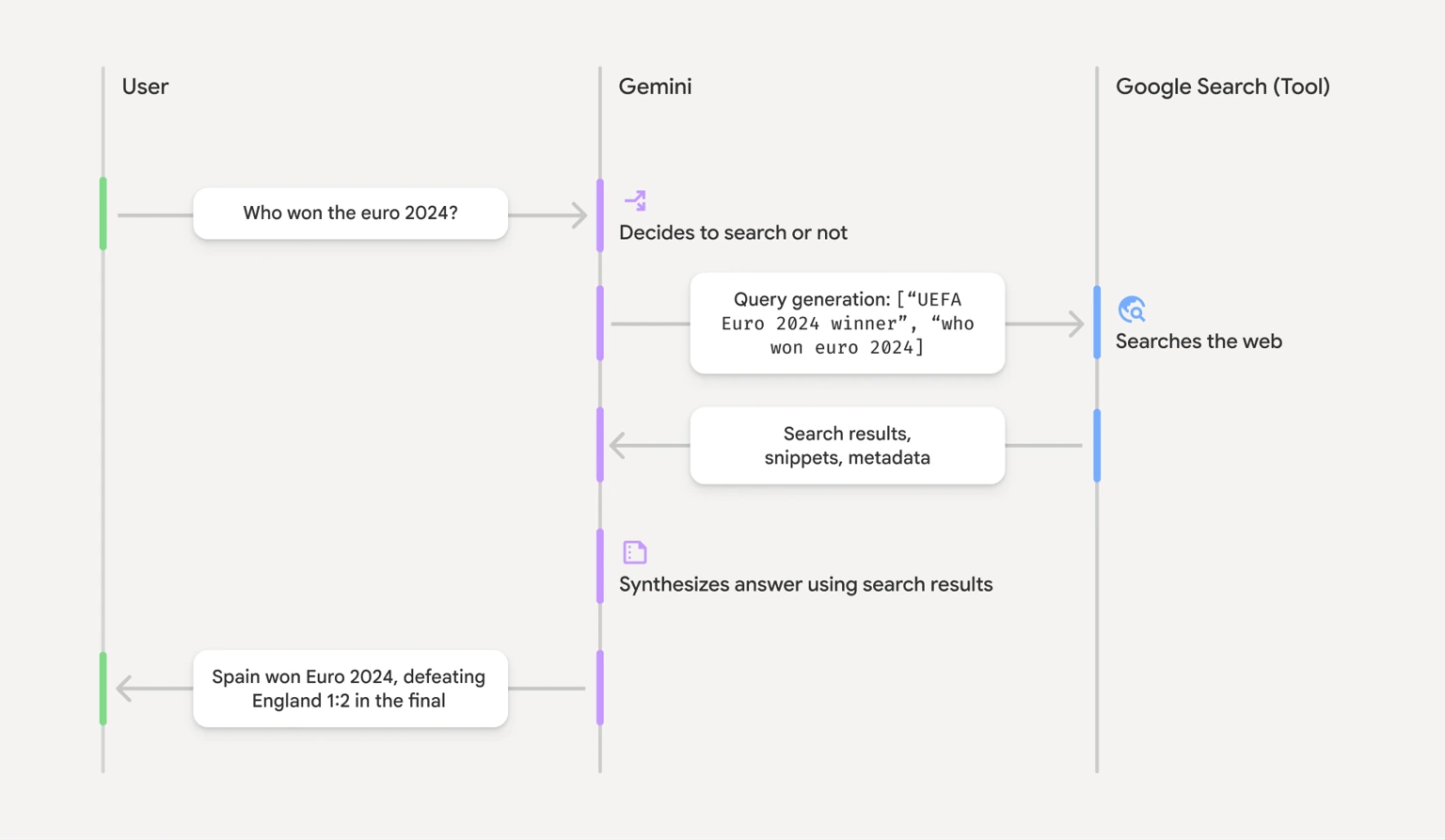
Links in a Gemini answer give you a way to check its sources, but they do not validate the whole answer. Grounding with Google Search lets the model use web search results while answering and connect parts of its response to sources it found. This is useful for changing information, such as the latest documentation, where relying on the model's memory alone would be risky.
Check whether the cited page actually supports the claim and covers the same version and period. A reputable website does not help if that page answers a different question.
How Gemini searches the web and adds citations
When an app enables Google Search for a supported model, the model decides whether to search and may make several searches for one request. Search results provide context for the answer. The app then displays citations in the format supplied by its API. Readers still need to open the original sources for important claims.
The Google documentation reviewed here uses the Interactions API, where the text's annotations field contains citations. Developers should follow the citation instructions for the API their app actually uses and provide links readers can open. Do not assume every API returns citations in the same place.
Hypothetical example: checking Thai-language support
Suppose you ask whether feature X supports Thai and get a 'yes' with a product-page link. Open that page and look for an explicit statement about Thai support for feature X. Check the update date, version, country and plan. 'Supports multiple languages' alone does not confirm it.
If a news story cites an announcement, follow it to the developer's documentation. When sources conflict, note their dates and qualifications rather than choosing the most confident-sounding one. Feature X is hypothetical, not a Gemini test result.
Check before trusting: four questions for reference links
Check important claims one at a time. You need not start by reading every link in the answer:
- Does the page support the exact claim, or just discuss a related topic?
- Does its publication or update date fit the period in question?
- Do the version, country, plan and exceptions match your case?
- Can you trace important figures or conditions to official documentation?
Enabling web search may incur costs, and one question may trigger multiple searches
Web search can also incur costs. Grounding documentation says billing differs by model and one request may produce several searches. Prompt count is not necessarily search count. Before estimating costs, check the latest pricing and quotas for your model, account and country.
When to use Google Search or your own documents
Google Search can provide context for recent changes on the public web. Internal contracts or unpublished manuals instead require a document retrieval system with access controls and traceable sources. Enabling web search does not automatically give the model access to private documents.
Before using an answer, open the evidence for decision-relevant claims and check the date, version and conditions. If the source does not address the claim directly, it remains unverified. This article draws on Google's documentation; it did not measure Gemini's accuracy through API calls.
Sources
Google documentation reviewed October 17, 2026. No real API calls or citation-quality measurements were made. Feature X is hypothetical; prices and quotas may change.