
What is Oh My Hermes? Workflows and memory for Hermes
If Hermes says a coding task is ready to hand off, has the code been fixed? Oh My Hermes organizes routes and records status, but you still need evidence from the executor. Here's what the add-on does beyond Hermes itself.

OMH coordinates work alongside Hermes
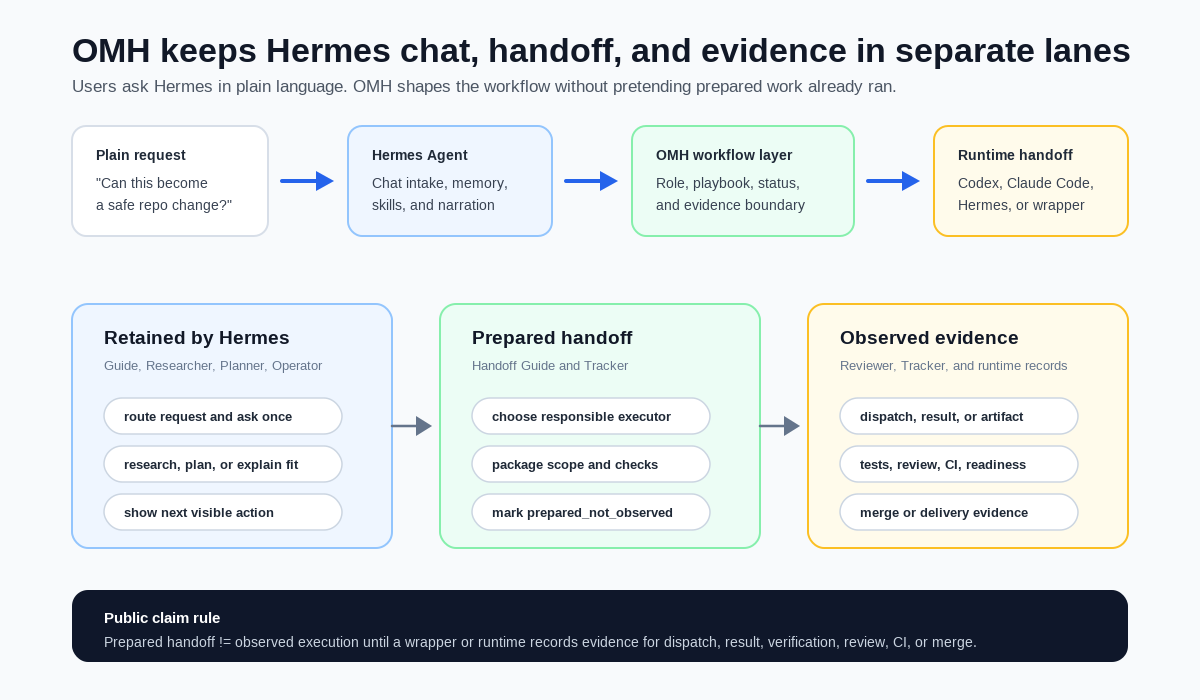
Oh My Hermes, or OMH, is an add-on that organizes Hermes Agent workflows, according to its developer. Hermes receives and coordinates requests; OMH plans workflows, routes models, prepares handoffs, and records observable status.
Hermes already has tools, Skills, and memory. To see what it can do without OMH, read the Hermes Agent overview first. It helps separate the add-on from the base agent.
Check whether OMH ran the delegated work
Take a bug fix: Hermes receives the request, the routing/wrapper layer chooses a route, and an executor edits the code. The guide distinguishes these roles because a prepared instruction is not an edited file. An external coding handoff needs context for the executor and evidence for you to inspect.
The developer's interaction map follows a request through routing, handoff, and observable status. In a report, prepared means ready to send; observed means there is evidence of what happened.
Verify routing against actual model calls
OMH lets you set a model and reasoning level per route, with fallbacks if a provider rejects the first model. Configuration states intent. To confirm which model handled a task, inspect the actual call rather than inferring it from the route name.
Before enabling several routes, check provider access, costs, and where a fallback sends context. Adding models does not automatically improve every answer.
Separate the add-on's memory from Hermes memory
OMH has its own long-term memory. Its README describes admission and retention policies and a recall pack selected for the task and token budget. It says OMH neither reads nor changes Hermes's existing memory, so you must manage both stores separately.
If you save a verified project setting, include its date and conditions. Don't turn an unverified web instruction into a permanent rule. Try editing and deleting memories when they become outdated, too.
Pin a version before installation and status checks
Before installing, choose a version or commit, read the steps for your OS, and back up your current settings. The documented commands serve different purposes: setup, update, and diagnosis. Run only what you need.
omh setupomh updateomh doctorThis article draws on the developer's documentation and diagram. KrobClick has not installed OMH, connected a provider, or run a workflow. We have no benchmark or verified routing result on our machine; the diagram describes the project's design, not our test.
Choose a trial where you can verify the handoff
Start with a small reproducible bug and define the pass criteria. Record separately what the plan prepared, what the executor reported, and what you found in the files and test results. Try parallel tasks after one route checks out. Agent count is not proof of completion.
If you only need to carry context into another session, read about Handoff Skill first. You may not need another orchestration layer.
Sources and evidence
- rlaope/oh-my-hermes: Source documentation pinned to a commit
- OMH: Documentation and claim boundaries
- OMH: Capability contracts
Reviewed rlaope/oh-my-hermes commit 81c8180e55e4aa6c4b98810c59286fcdda52f12b on October 30, 2026, Thailand time. This article explains upstream documentation and images; we did not install or test a live service connection. Capabilities and terms may vary by version.