
REA: Reverse Engineering with Traceable Evidence
If you can find the Export button but not where its data comes from, REA lets a coding agent trace the program with analysis tools. This article examines developer examples and evidence, separates what code shows from what requires runtime testing, and covers file support, permissions, and data sent to a model.
REA connects AI agents with software understanding tools.
REA stands for Reverse Engineer Anything. Morluto’s project lets coding agents call software-analysis tools through MCP or use the same tools from a CLI. Evidence might include decompiled code, machine instructions, and function relationships. The answer should also say what remains unknown. Read an overview of REA from the original project
Here, reverse engineering means studying the structure and behavior of an existing program or file to understand features, check compatibility, or develop your own code. Decompiled code need not match the original source: compilation can remove variable names, comments, and parts of the structure.
For a question such as “Where does this Export button get the data for its output file?”, an agent can use REA to trace the path and point to file locations for a person to inspect. That saves copying findings between tools, but the locations still need to be checked against behavior; the button label alone is not an answer.
Agent asks questions and REA returns evidence from the tool.
Begin with a specific question. The agent breaks it into smaller tasks, calls REA to read or observe what its tools support, then explains the findings or investigates further. The tools provide evidence; the agent interprets it.
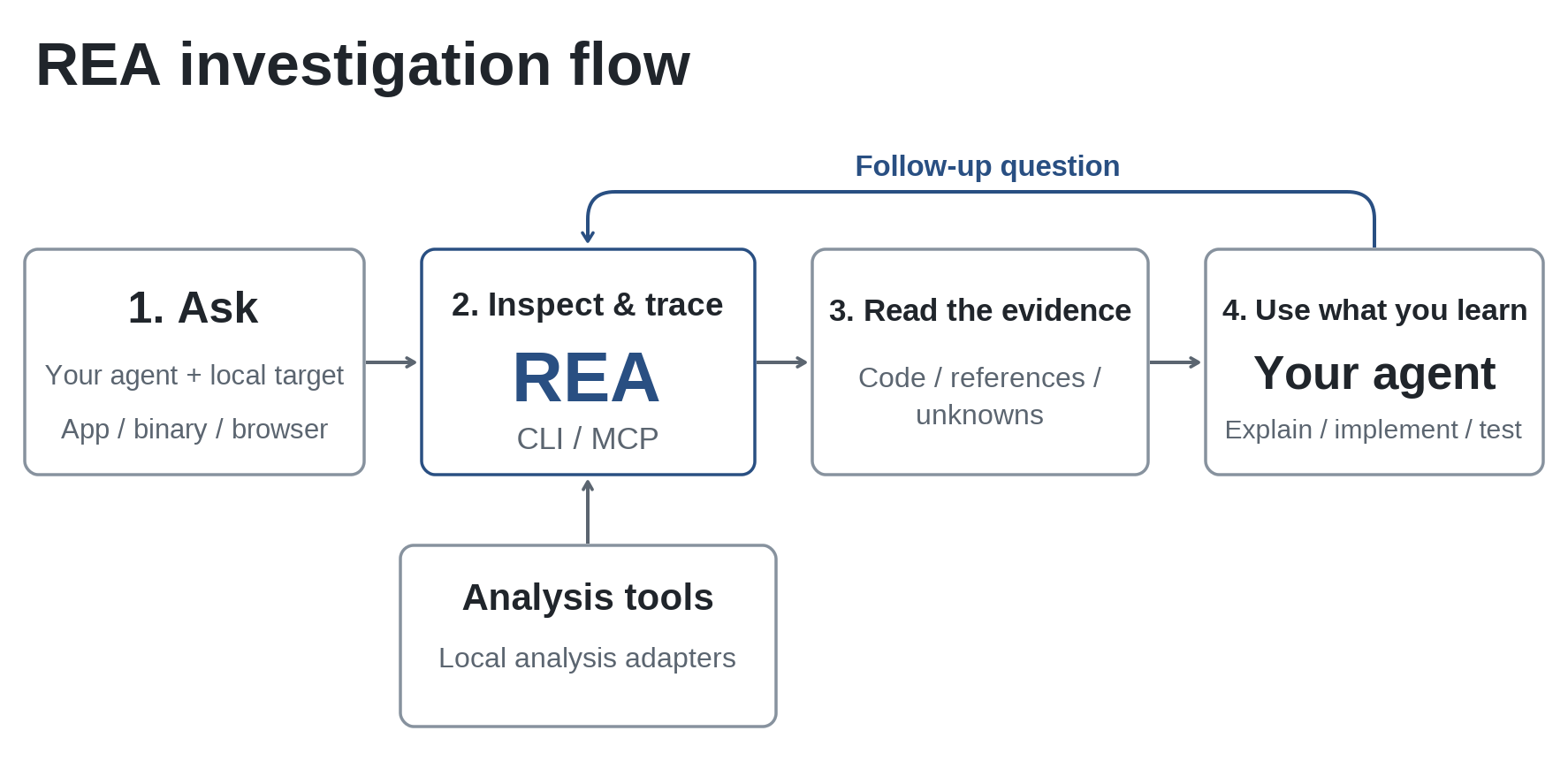
MCP lets the agent call REA, which can connect to analyzers such as Ghidra, Hopper, or IDA. It is not another AI model and does not replace native analyzers for every task. Native binaries may need those tools, whereas some JavaScript can be read statically without running code or invoking a native analyzer.
Separate what a tool found, what the agent inferred, and what was tested at runtime. A fragment of code does not prove an app always behaves that way. Check call sites, conditions, and untested cases before using the conclusion.
What can REA be used with?
Websites, desktop apps, binaries, Android apps, firmware, and network captures need different methods and supporting tools. This table reflects documentation on main reviewed October 23, 2026, not verified support in every release. Compare the installed package and tools actually visible to your agent.
| Category | Sample file or work | What can be analyzed | Conditions and limitations |
|---|---|---|---|
| Website / Web App | SaaS, Web AI or Dashboard with access | Page structure, JavaScript, and observable network requests | Connects to Chrome-family browsers through CDP; sees only page-exposed data and the recorded period, not all server-side code |
| Browser Extension | Chrome or Edge extension | It has not yet been confirmed that direct extension analysis is supported. | The reviewed documentation does not yet provide specific steps for Manifest, Extension APIs, or files .crx; Reading the isolated JavaScript does not confirm the behavior of the entire extension. |
| Windows program | Native files .exe, .dll in PE format | Functions, assembly instructions, pseudocode, and function call points | There must be an analyzer such as Ghidra, Hopper, or IDA that supports the file; File .exe or .dll which is .NET uses another group of analysis. |
| macOS program | App pack .app and Mach-O files | App-bundle structure, file listings, and component relationships; native code can be analyzed further with supported tools | Inspecting app structure and decompiling code are separate steps. Match the program file and architecture to the analyzer. |
| Linux program | ELF executables and libraries .so | Functions, machine instructions, symbols, and references in the binary | The file formats and architectures supported by the analyzer must be checked; The file's operating system name does not indicate which machine it can be analyzed on. |
| Android apps | Files .apk | Manifest data, classes, decompiled methods, and references | Requires headless JADX and the full Java Development Kit (JDK); This job reads files without running the app. and does not include automatic analysis of native libraries within the APK. |
| .NET program | Assembly created in C# or other .NET languages. | Metadata, Common Intermediate Language (CIL) instructions, methods, and native-code call declarations | Static review without loading or running code does not confirm runtime behavior |
| Electron app | App folder or file .asar | JavaScript modules, imports, source maps, and interprocess communication through IPC | Can be inspected without running the app, but runtime-generated names or paths may not be fully traceable; native add-ons may require separate analysis |
| Games | Native games such as DX-Ball | The logic of the selected function, such as a sound position calculation formula. From machine commands and call points | Use methods suited to the game's file type. A one-function case study does not prove complete source or structure recovery for every game. |
| Package files | .zip, .ipa, .asar | List of contained files, resources, and app structure; Reading the internal code depends on the file type. | Opening the file list does not equal decoding or running the app in its entirety; IPA is an iOS app package, not an Android APK. |
| Firmware | Device firmware files | File sections, internal parsing results, and files that can be passed on for native analysis | Use Binwalk / Unblob on Linux according to the guide, supplying additional tools yourself; this does not emulate or run the entire firmware system |
| Network Capture | Files .pcap, .pcapng that has already been recorded | Protocols, destinations, DNS, TLS SNI, and HTTP request data present in the file | Requires TShark / capinfos. The PCAP summary and packet field selection tools have different operating-system limitations; they do not capture live traffic themselves. |
To choose an analysis method, consult the upstream documentation by target type: List of task types in README, Websites and CDP, JavaScript / Electron / ASAR, Apple app bundles and IPA, Android APK, .NET and Firmware
The PCAP docs describe two paths: PCAP summary tool uses TShark and capinfos, with Linux/Windows requirements and a macOS limitation; Field selection and packet filtering tools specifies Linux, TShark 4.x, and prlimit. Do not assume every tool supports PCAP in the same way.
Before assigning a task, check the target file’s platform, the analysis machine’s platform, and which analyzer is installed. A Windows game binary and running Ghidra on Windows are distinct requirements. Read Differences between main code and published packages and check the tools exposed by your REA server. The table summarizes developer documentation; KrobClick has not tested all 12 target groups.
A report should identify the file version or hash, observation period, and cases not covered. When software changes, recheck the relevant paths; an older binary or network capture cannot validate every later version. This is KrobClick’s reporting advice, not a claim that REA records all of it automatically.
Read the evidence to identify what remains an assumption
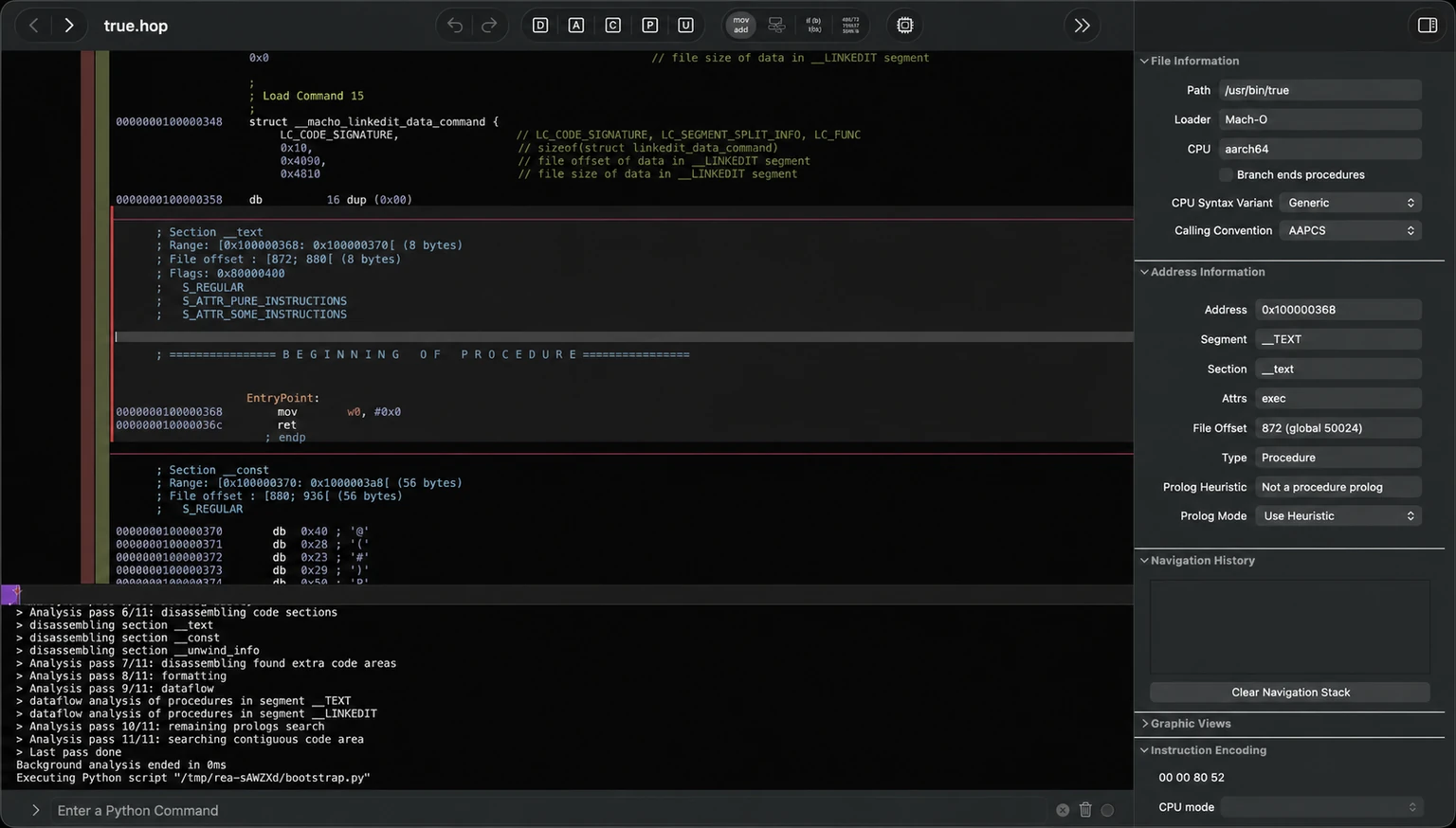
The Hopper image shows assembly instructions, file details, and analysis logs. Keep those separate from the agent’s explanation. Pseudocode is a readable reconstruction, not the original source; optimization can make the original structure and some information particularly hard to recover.
To assess an answer, follow its evidence rather than its summary:
- Where is the evidence: Is there a filename, source location, or function address you can inspect?
- What supports the conclusion: Is this merely a possible code path, or evidence that it ran?
- What remains unknown: Which value, channel name, or destination still depends on runtime computation?
- How to test: Which inputs and conditions were tried, and what was the output compared with?
REA’s browser guide uses an Export button as an example. A network capture can show that JSON was requested during the observation window; the CSV-generation logic must be traced in the script separately. Starting a capture now does not recover earlier activity. Example website and network-request analysis
Developer example: using REA to inspect a percentage calculation
Calculator: the percentage button depends on the preceding operator
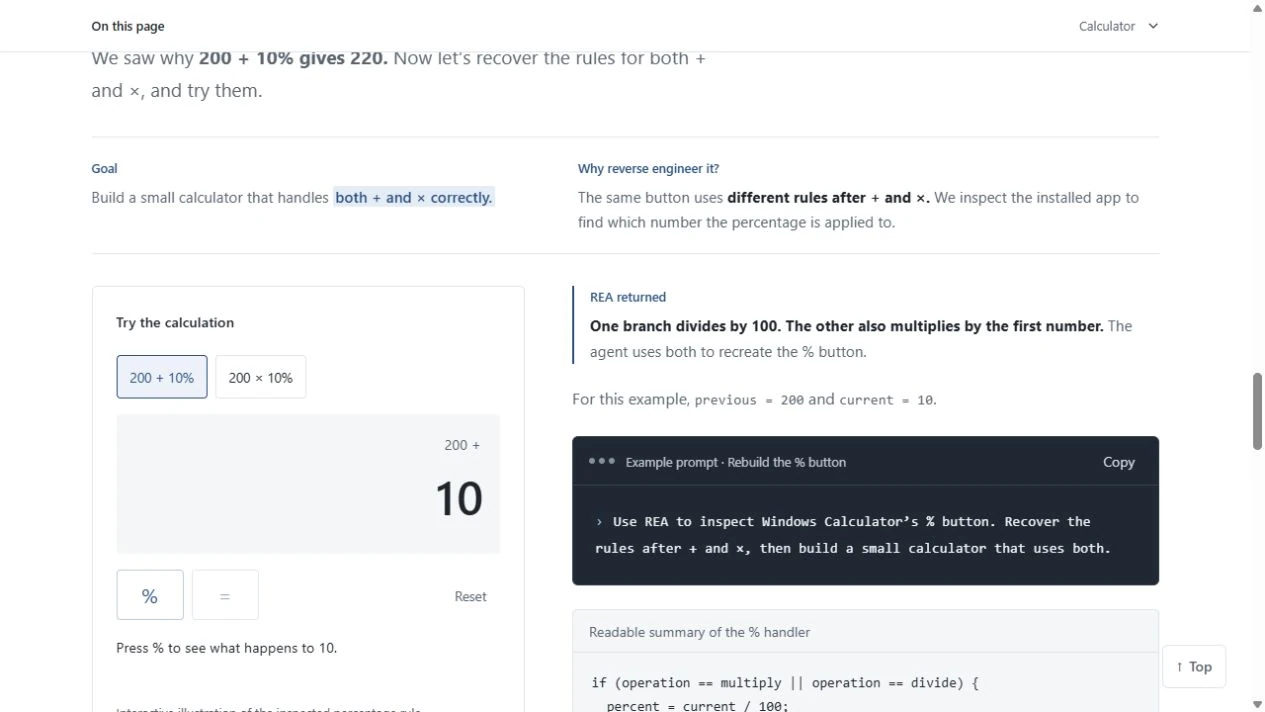
In the developer’s Windows Calculator example, 200 + 10% returns 220 because the percentage after plus is based on the first number, while 200 × 10% returns 20 because 10% becomes 0.1 before multiplication. REA traces the reconstructed instructions and compares them with Microsoft’s source. Example Calculator from REA
“The percent button divides by 100” misses its dependence on the preceding operator. To recreate the behavior, test several operators and inspect the values passed to the function. One input cannot establish every case.
Dinosaur game: Read the speedup rules from the script.
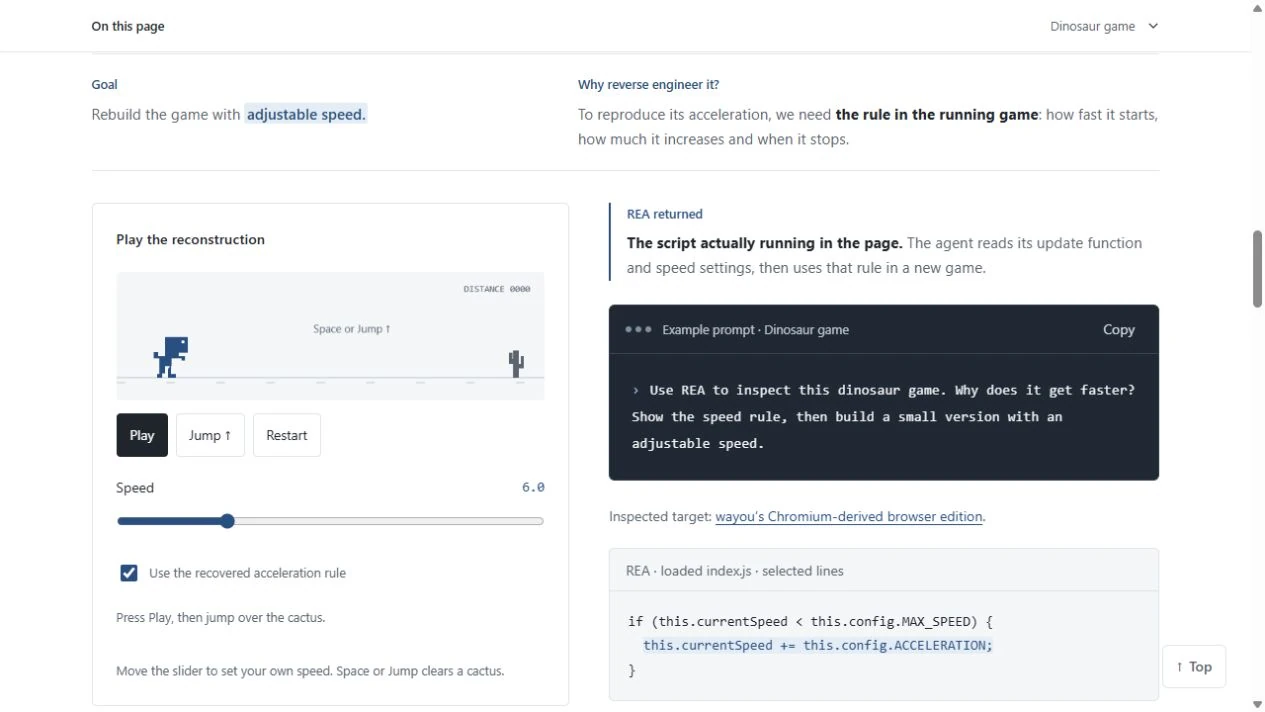
On REA’s site, the Dinosaur game example uses a speed-increase rule read from a script to build an adjustable simulation. You can compare the simulation with the rule, but this remains the developer’s demonstration. View the developer's example
Electron: On-screen buttons may send jobs across processes
The JavaScript/Electron guide traces CSV export in a sample Notes app: the task moves from the renderer through preload and IPC to a main process that writes the file. REA connects a channel name to a handler found in code so an agent can follow the data. This is the developer’s example, not an analysis of a reader’s app. Guide along the CSV export path
The button may be in the renderer while the code needing a change is in another process. If a channel name is constructed at runtime or its handler cannot be found, observing the running app may be necessary.
DX-Ball: When the pseudocode doesn't tell the complete formula.
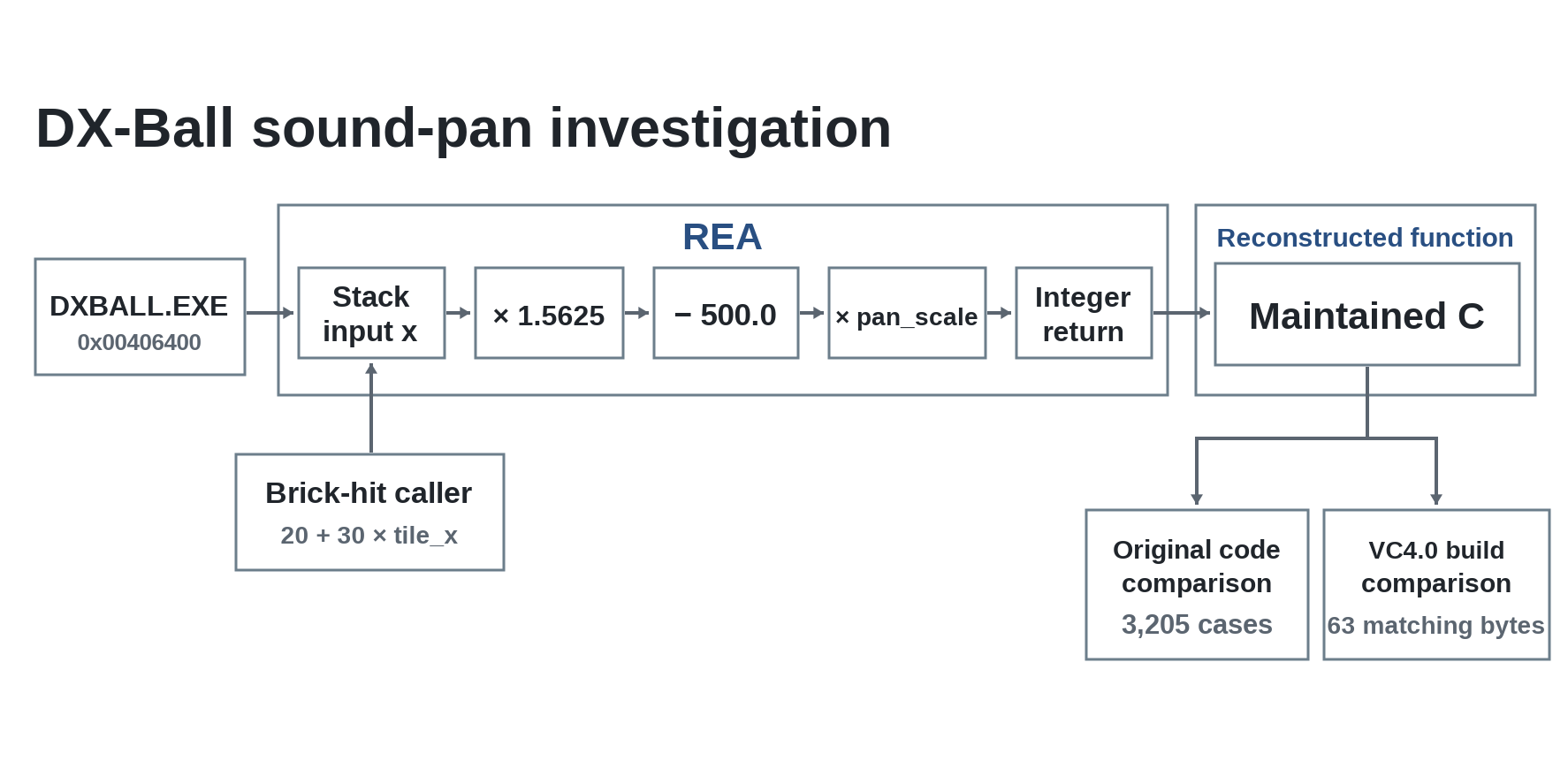
The native-analysis guide traces a DX-Ball function that pans sound left or right. Initial pseudocode was incomplete, so the investigator inspected machine instructions, call sites, and constants. The developer reports testing a replacement against the original function with 3,205 inputs and reproducing all 63 function bytes. Those figures describe this case, not REA’s overall accuracy. DX-Ball evidence and verification method
For a formula, record inputs and expected outputs. For a control-flow claim, show the start, end, and intervening conditions. A passing comparison supports only the behavior actually tested.
Choose a clearly scoped, authorized first task
The rea-agents 6.9.0 package lists Node.js 22.x from 22.23.4, 24.x from 24.22.1, or 26.12.1 and later, plus npm. Node.js 23, 25, 26 before 26.12.1, and prereleases are outside its supported range. Check the package version and latest installation guide before installation: requirements can change, and extra tools depend on the target. KrobClick has not run this setup command:
npx rea-agents setupDuring setup, choose an agent, review the configuration changes, and approve them before use; then restart the agent. Native binaries require separate checks of analyzers and supported systems. Consult latest installation guide to compare the code on main with the npm package you actually install.
A first task might be: “Analyze a sample app I am authorized to inspect. Explain which data its Export button writes, name the relevant files and functions, separate code findings from runtime observations, and list what remains unverified.” This KrobClick example gives an agent a narrower question and evidence to return instead of asking it to understand an entire app at once.
Local analysis still requires checking what data the agent sends onward
REA’s FAQ says its tools analyze files locally without uploading the app to an REA analysis service. Tool results still enter the agent’s context. If the model is hosted online, code or file contents may reach its provider; read that provider’s data policy separately. Explanation of information in the project's FAQ
REA’s security policy warns that it is not a sandbox. An analyzer reads files with the user’s privileges, and session controls cannot stop a malicious process already running under the same OS account. Runtime analysis may also launch or interact with a target, unlike static file reading. Read REA's protection boundaries
Restrict which folders and data the agent can read, check model and tool permissions, and isolate risky files appropriately. Before sharing a log for project support, remove credentials, private paths, and target-program data as the developer advises.
REA’s MIT license covers the tool, not the programs being analyzed. Users are responsible for permission and applicable rules. Start with your own software, project samples, or software whose terms permit your intended analysis.
REA is suitable when you have a clear question and need an evidence-based answer.
REA can help developers tracing behavior across files or components find where to investigate next. If the source is available and the question concerns one short function, reading it directly may be simpler. Someone who only needs to use an app does not need an analysis tool.
Before acting on an answer, follow its evidence, note what remains unknown, and try to devise another input to challenge the conclusion. This checklist identifies unfinished work; a person still has to design a test for the actual question.
For agent permissions, see Zero-trust for AI agents; for dividing coding-agent work, see OpenRig and the coding agent team Image credits and licenses are listed in List of Crafting Apps and REA image sources
Original sources and images
- GitHub: morluto/rea — README and project documentation
- REA: Calculator operation and examples
- REA: Native binary analysis — DX-Ball
- REA: JavaScript and Electron analysis
- REA: Browser and network analysis
- REA: Installation and differences between main and release versions
- REA: Security policy and security boundary
- REA: MIT License
- REA: Website observation with CDP (reviewed 23 October 2026)
- REA: JavaScript and ASAR analysis
- REA: Apple application bundles and IPA
- REA: Static Android APK analysis
- REA: Managed-code analysis (.NET)
- REA: Firmware analysis
- REA: Packet capture summaries
- REA: Recorded packet capture inspection
- REA: Released package and main (reviewed 23 October 2026)
The original documentation and images were reviewed on October 11, 2026, Thailand time. Repository images reference commit 69fe5b6010f2658d302cf2c6e6a8b770205da080; Calculator and Dinosaur screenshots were captured from their original websites that day. Only the section on additional task categories REA can analyze was reviewed again on October 23, 2026, against documentation at commit b7f8bbb49fbb675c392e346c9c0c1b56670ab680. Only the installation requirements for rea-agents 6.9.0 were checked again on November 16, 2026, against npm and the current installation guide. This article explains the developer's documentation and case studies; it does not report a KrobClick installation or test of REA. Capabilities on main may not yet be included in the published npm package. Check the documentation and version you use before following along.