
Concat Video Editor: Local Processing and Output Checks
If footage needs to stay on your machine, Concat may be worth testing. Its developers say it requires no account and includes AI tools. Before moving a project from your current editor, test Thai captions, cuts, and exports on your own clip. A feature list cannot establish output quality.

Concat is an open-source video editor in beta
Concat is an open-source video editor that its developers say runs locally, requires no account, and exports without a watermark. The README lists multitrack editing, text, keyframes, effects, and AI tasks such as caption transcription, speech generation, and background removal. The project positions itself as a CapCut alternative, but KrobClick has not compared quality or speed.
Concat is still in beta despite offering installers for several platforms. The main-branch README may describe features that differ from your installed version. Open the release notes for that version and check your operating system and CPU architecture first.
One version-specific example appears in release notes 0.2.11: the developers report fixes for black frames at cuts and a fallback for black Windows previews, though the fallback may omit effects. They say their Intel Mac caption fix had not been tested on hardware. Check cuts, effects, and exported files yourself. These are developer reports, not KrobClick test results.
If you are comparing categories of creative apps, see FilmCraft in the Crafting Apps suite. This article instead focuses on testing Concat with Thai video, offline use, and exported files before moving a project.
When Concat needs an internet connection
The README describes a native Rust engine using the GPU for compositing and AI models downloaded through Settings before offline use. CODE_SIGNING.md states that the app has no telemetry and does not send project data or media out. It still connects when users request version checks, updates, or model downloads.
Local processing does not mean the setup phase needs no internet. For offline work, download the required models first, disconnect, then test opening, editing, transcribing, and exporting. KrobClick proposes this test but has not verified offline operation itself.
Local files still need storage and backup checks. If the project folder syncs to the cloud, a separate sync app may transmit the files. Trace the actual file path before using confidential footage.
The text panel shows formatting options; it does not establish subtitle accuracy
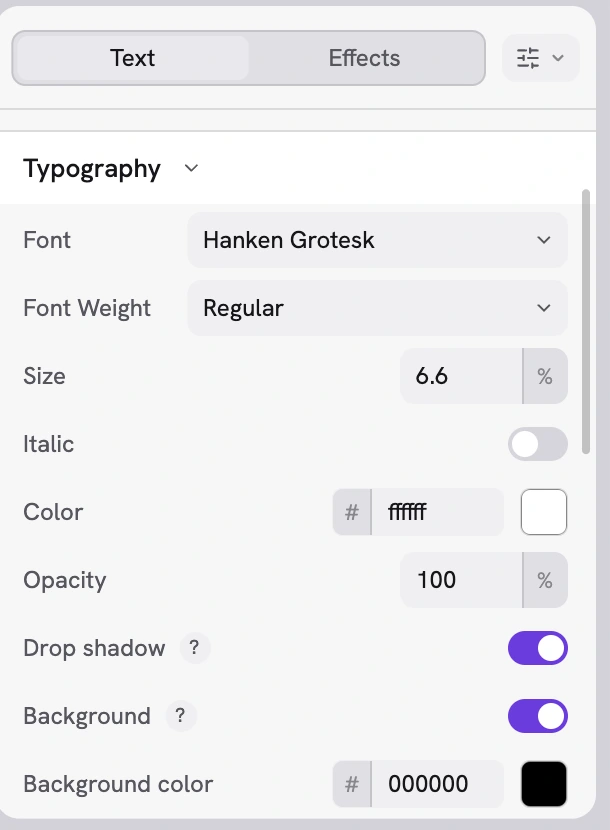
The developer screenshot only shows text-formatting controls. It cannot establish whether Thai transcription, stacked tone marks, or caption timing works. Check those in an exported clip before publishing.
For mobile video, test names, numbers, spacing, and line breaks. Include Thai upper and lower vowels and tone marks. Open the export in another player to check for clipped glyphs and legibility. Use a licensed font that supports Thai.
Test one clip from import to opening the exported file
Start with a copy of a clip you have rights to use and that contains no sensitive data. Choose a short Thai explanation with English words, names, and numbers. Write down what was spoken to check the captions rather than relying on memory.
| Step | What to try | What to record |
|---|---|---|
| Import | Open the clip on the device you actually use | Program version, operating system, codec, image size, and frame rate of the original |
| Edit | Trim the beginning and end, separate sections, and move clips. | Cuts, black or frozen frames, and audio after moving clips |
| Subtitles | Transcribe the audio and compare it with your reference transcript | Model name, transcription errors, timing, and sections that need manual correction |
| Save | Close and then reopen the project. | Media links remain intact, and text and effects restore correctly |
| Export | Export to the target format and open it in another player | Duration, audio-visual synchronization, image dimensions, text, and issues absent from preview |
For vertical work, test a vertical clip from the start and check that text and essential content remain in frame. With multiple audio tracks, listen to the exported file; a good preview does not establish that the export sounds right.
For background removal, use a scene close to your real work and examine hair, hands, motion, and colors similar to the background. Generating or imitating another person's voice requires rights and consent. An app feature does not grant permission to impersonate someone.
Set pass criteria before testing: reviewed captions, no damaged frames, and a project you can reopen and edit. Compare speed only on equally sized jobs with the same model. Until you inspect the export, you cannot say it replaces the old editor.
Check the installer and API scope before expanding your workflow
The reviewed policy says Windows builds are not yet code signed, so SmartScreen or Smart App Control may block them. Before installing, check the release page, publisher, and checksum if available. Do not disable system-wide protection on the strength of a short recommendation. If you cannot confirm the file's origin, stop.
Concat also has an API for scripts or agents. Its documentation says the Remote API is off by default; when enabled, it listens locally and uses a token unless you configure another address. Manual editing does not require it. Before connecting an agent, check which files and commands it can access and where the connection is exposed.
Keep your source files and old editor. Run the necessary workflow on a small copy and inspect the exported file before deciding whether to move your work.
Developer documentation and images
- Concat: README pinned to reference version
- Concat: Code signing and Privacy policy
- Concat: Downloads and release notes
- Concat: policies for mentioning the product and using screenshots
The repository was checked on October 18, 2026, at commit f70332cc. The version 0.2.11 release notes were checked separately on November 16, 2026; other sources were not reviewed again. The image is a developer demonstration, not a KrobClick test. We did not install the program, test Thai captions, or verify performance. Downloads may differ from the main branch, and capabilities may change.