
Google AI Studio Safety Settings: Filters and Their Limits
Does tightening Safety Settings make an AI app’s answers consistently accurate and safe? No. Content filtering and answer-quality checks address different problems.

Safety settings filter content by risk category
An answer can still be wrong after you make the safety filter stricter. Google's safety settings let developers adjust blocking for certain content categories in the Gemini API and Google AI Studio. The filter estimates how likely text is to fall into a risk category; it does not verify evidence, arithmetic or suitability for an individual user.
Check answers that pass the filter, especially when they affect someone's rights or money. A blocked answer does not itself mean the facts in the question were wrong.
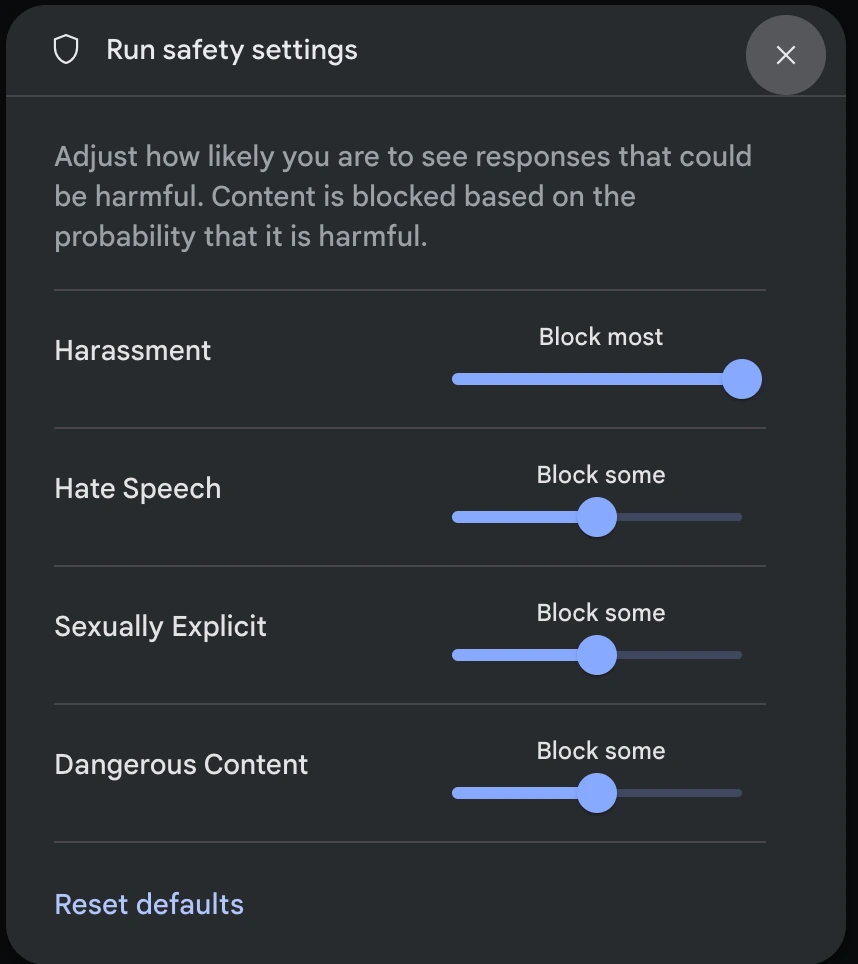
What do Block few, some, most and Off mean?
| Levels in AI Studio | How probability-based blocking works | Points to understand |
|---|---|---|
| Block few | Block when the risk-category probability is high | Other levels may still pass |
| Block some | Block from the medium level upward | Stricter than Block few |
| Block most | Block from the low level upward | Some ordinary text may be blocked |
| Off | Turn off the adjustable filter for that category | Core model protections remain |
According to Google's documentation reviewed on October 17, 2026, adjustable filters default to Off for Gemini 2.5 and newer models, while some core protections cannot be disabled. Do not assume your production system uses the default. Check its categories and settings for the selected model and API.
How to test filters in Google AI Studio
- Select a model in Google AI Studio, then open Run settings → Advanced settings → Safety settings as shown in Google's guide. Menu names may change with the interface.
- Define the app's task, its users and what content it should not show. Choose a blocking level that fits those risks; do not lower it just to obtain an answer.
- Try safely worded tests: an ordinary question with ambiguous terms, a sensitive educational question and a question with insufficient information.
- Record whether the system answers, refuses or displays Content blocked. Compare answers that pass with the source material.
- Give users a useful explanation when the system cannot answer instead of retrying the same request indefinitely.
Hypothetical example: An assistant explains return requirements.
Consider a returns assistant. Suppose a store allows returns within 14 days, but the AI says 'within 7 days.' That answer might pass every safety category while misrepresenting a customer's rights. Block most does not compare seven days against the current policy.
The operator should supply the policy's effective date, require citations to relevant sections and compare answers with the original. If the document has no such rule, the assistant should say it cannot find one. Test partial returns, damaged items and outdated policies too. The seven- and fourteen-day figures are hypothetical.
What the filters cannot do
Google's guidance calls for risk assessment, testing and review of model output: an unblocked answer may still be wrong, biased or unsuitable. Settings selected during an AI Studio experiment do not prove that every API call in the deployed app uses those settings.
Before releasing the app, check its production filter settings, compare answers with source material and review data-access permissions. This article explains developer documentation; it did not change settings in a live account or call the Gemini API.
Sources
Developer documentation reviewed October 17, 2026. Settings were not tested on a real account. Shop examples are hypothetical; filters and UI may vary by version.